Tutorial: create an HTTP Teststep to run an HTTP GET request
We will use the real-life iTunes Search API from Apple to get you started with testing in APIJockey TEST:
The documentation of this API is provided here on iTunes Search API Documentation Archive
When you work with a large number of webservices, with various releases, you will find it necessary to organize your tests in a structured, hierarchical way.
We define our tests in this hierarchy:
- Repository
- Testset
- Testcase
- Teststep
These tree elements are mandatory for creating teststeps. APIJockey TEST provides several types of teststeps. For now, we focus on the HTTP Teststep to run a HTTP GET request.
Create a Repository
We switch to the Test definition view, and create a new repository.

This will open a dialog where you must enter the name of the new Repository. We enter the name music store. Confirm with OK. You can rename the repository at any later point in time. You will get the following view:

Create a Testset
Make sure the toggle Show testsets is on and your repository music store is selected.
You are ready to create your first Testset. click with your mouse on the Button new Testset.

This opens a new dialog, enter exploration tests as the testset name, confirm with ok and we are done in the navigation view and continue in the content view with the Testcase View.
Create Testcase
To create a new Testcase click the Create new testcase button. Make sure, testcase view visible is on.

This will open a dialog where you enter the name of the testcase. We'll call it Jack Johnson 25. (Artist with name Jack Johnson limit of 25 results.
Create an HTTP Teststep
A HTTP teststep performs URL requests for various HTTP methods with or without body JSON/XML data.

The globe icon-ed button creates a new HTTP Teststep.
This opens a dialog, which asks you to enter a name for the new teststep. We'll give it the name GET list, confirm and close the dialog.
The dialog offers an option to select a Service definition which we will not choose to do.
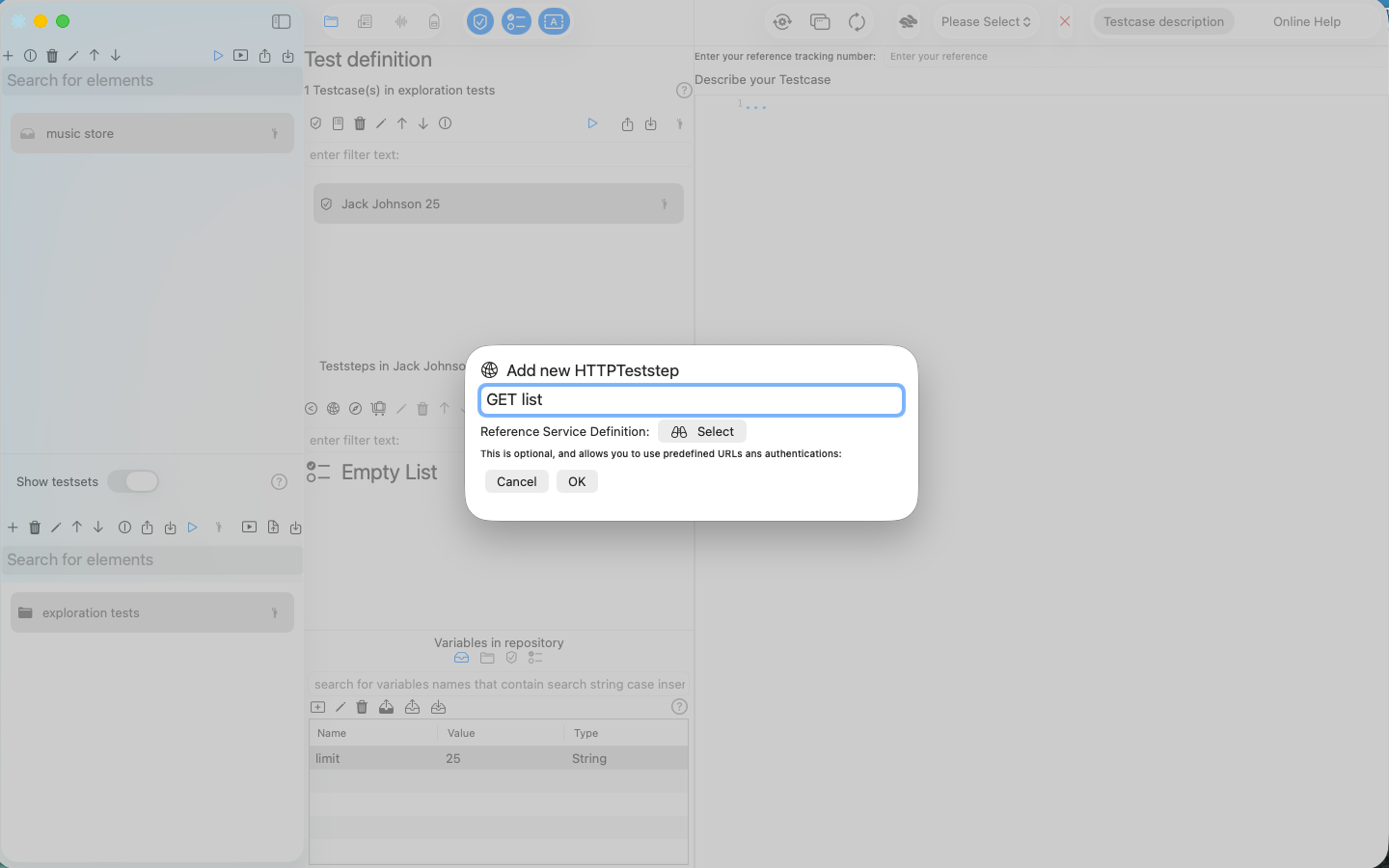
This has created a new HTTP Teststep that will appear at the top of the list.
We will use the real-life iTunes Search API and search for the artist Jack Johnson
The documentation of this API is provided here on iTunes Search API Documentation Archive
Please don't understand these screenshots as any kind of endorsement from Apple® for this software.
You may use the following request in an application that wants to retrieve a list of music titles. We will use one sample request from the iTuneSearchAPI documentation, then search for titles of Jack Johnson limiting the result list to only 25 hits. We use use the following HTTP request URL:
https://itunes.apple.com/search?term=jack+johnson&limit=25
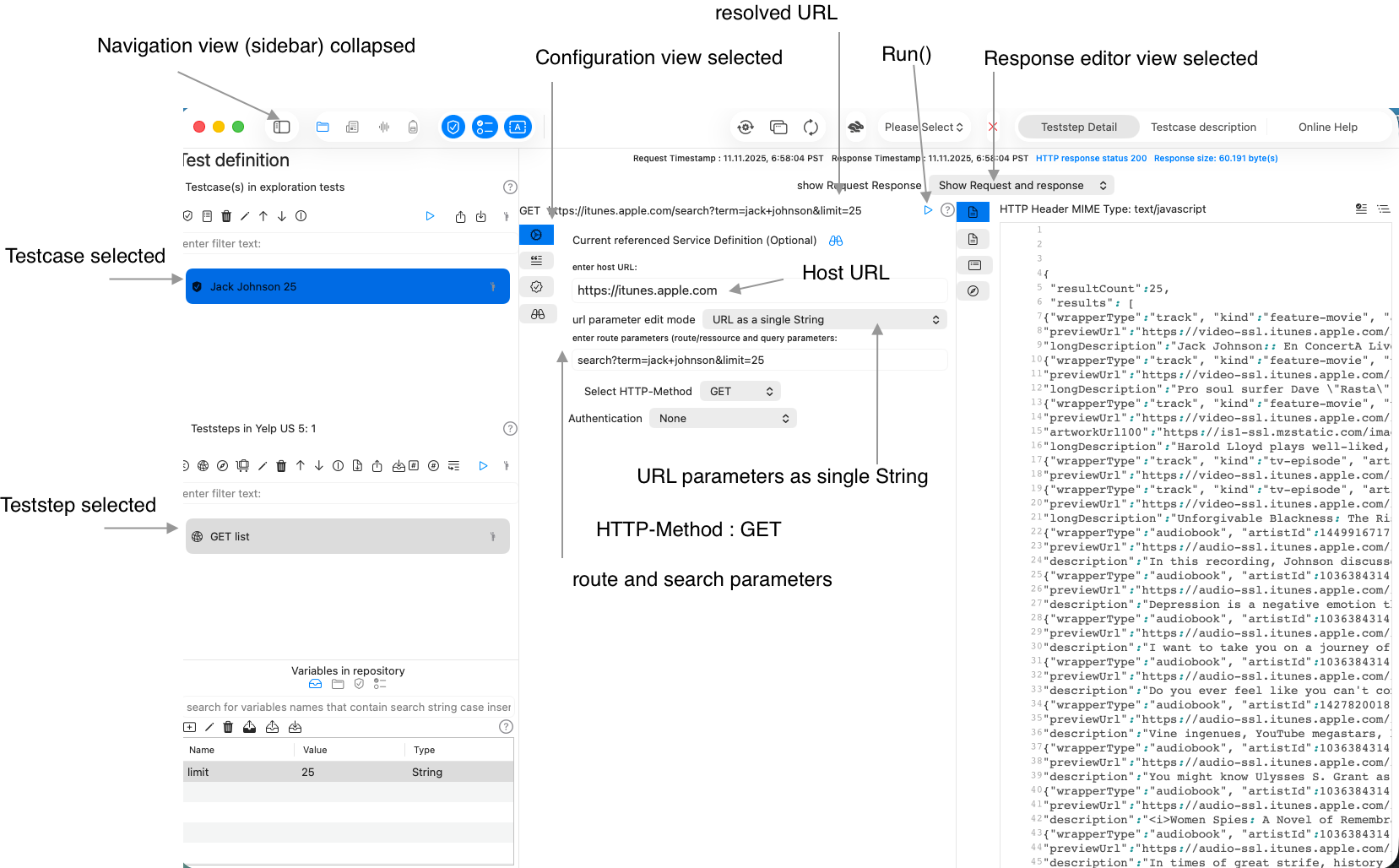
To make our lives easer, we will, close the sidebar (navigation view) and configure the HTTP Teststep as in the screenshot below:
- We have collapsed the navigation view, this means we do not see the selected repository and the selected testset.
- We have selected the Testcase Jack Johnson 25
- We have selected the Teststep GET list
- We have selected the configuration view of the request
- host URL = https://itunes.apple.com
- Url parameter string = search?term=jack+johnson&limit=25
- Url parameter mode = URL as single String
- HTTP-Method = GET
- Authentication = None
When all this is set, you press the Run() button and will see a result in the response.
Congratulations, you are done!